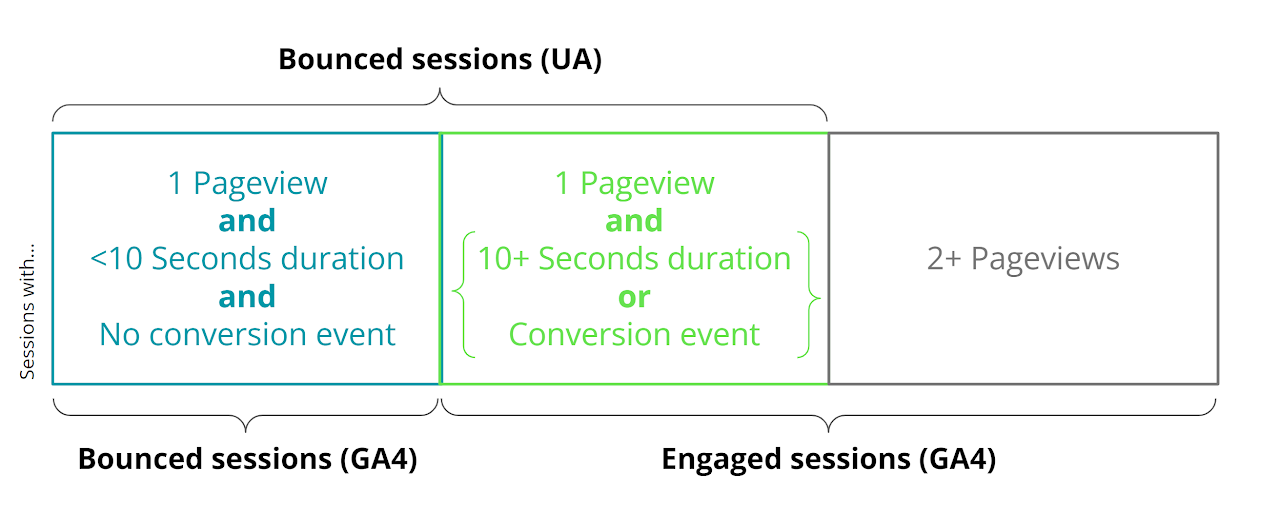
Let’s pop these questions of what bounce and engagement rate exaclty is, but if you’re pressed for (engagement) time, the short version is that a
session
counts as engaged if the user views 2 or more pages; or even if they only view one page they complete a conversion on that page or engage for more than 10 seconds.
In the above image we’ve broken down the difference between bounce rate in the old version of Universal Analytics (UA) and Engaged Sessions in GA4.
UA’s definition of bounce rate was very straightforward - 1 pageview in a session makes it a ‘Bounced’ session, 2+ pageviews in a session make it a… not-bounced session.
Now, think of a website that provides users with long-form ‘How To’ content; blogs on topics like ‘How to put up a bookshelf’, for example. It could be that a user looking for a step-by-step guide to putting up a bookshelf gets everything they need from one pageview. Is UA’s methodology of calling this session a ‘Bounce’, implying a failure on the part of the content, fair?
Similarly, if your website has a specific page that contains a lead-generating ‘More Information’ PDF file, and a high-interest user bookmarks that page, clicks into it one day, downloads the PDF and then later begins a purchase ‘IRL’, was that 1-pageview session necessarily a low value one?
GA4’s definition of engaged sessions; sessions with 2+ pageviews or 1-pageview sessions with either 10+ seconds engaging with that page, or a conversion event completed, both accommodate for the above scenarios. In other words, GA4 would recognise that the user learning how to put up a bookshelf (10+ seconds on site) and the user downloading the lead-gen PDF (conversion even completion) both still count as engaged, despite only viewing 1 page.
That’s the logic behind GA4’s engagement rate, engaged sessions, etc. metrics in a nutshell. If you want to dig a little deeper, there’s two key factors when defining and measuring engagement in GA4; engagement time, and engagement rate.
What is “engagement time” in GA4?
Google’s support pages have a pretty thorough definition of how they measure engagement time but essentially the moment a user opens a web page or app, Google hits start on a tiny invisible stopwatch, secretly counting how long (in milliseconds) the user has been on site.
Whenever that user has a meaningful interaction with the site (like scrolling to a certain depth, tapping a button, or clicking through to a new page or screen) that tiny invisible stopwatch sends a report to GA4 - “At exactly 2,307 milliseconds the User clicked!”
If the user closes their browser, shifts to a different tab, closes the app or otherwise “leaves”, the stopwatch pauses.
That’s engagement time.
The table on the aforementioned support.google page about engagement time gives a clear visual representation of how engagement time is tracked;
User…
event_name
user_engagement_msec
visits for the first time landing on first page
first_visit, page_view, session_start
N/A
scrolls down the page
scroll
8781
navigates to next page
user_engagement
11856
visits second page
page_view
N/A
scrolls down the page
scroll
6677
leaves the website
user_engagement
7711
What is “engagement rate” in GA4?
Part of the reason that Google has sunset Universal Analytics and transitioned to GA4 is to better reflect and report on modern browsing behaviour. Because be honest - how many tabs do you have open right now?
The moment a page or app screen is loaded, GA4 logs a “session_start” event, and that “session_start” event does exactly what it says on the tin - it marks the start of a session.
But what if the User then leaves that browser tab or app screen open and unread - to go do something else for an hour, or a day, or a week? Does it make sense to call that session an hour/day/week long? Of course not.
When a User is on your site or app for more than 10 seconds; when they click from the first page or screen through to a second; or when they complete a “conversion event”, that session is labelled in GA4 as an “engaged session”. Engagement rate is the % of sessions that are engaged vs “disengaged”. “Disengaged” isn’t a term we actually use - we call those sessions “bounced”.
There were a couple of slightly vague terms we’ve used here - for example, we said that a session is marked as engaged when they complete a “conversion event” - but what exactly is a conversion event?
Conversion Events in GA4
In your GA4 Property, if you click into ‘Admin’ (i.e. the cog/gear in the bottom left corner) and then ‘Conversions’ (i.e. the little flag beneath ‘Property’) you can see and customise every user event that GA4 will define as a “conversion”.
If you remember the days of ‘Goals’ in Universal Analytics, they’re quite similar to those. If you want to go a step further, they’re very similar to hit-scope Goals in Universal Analytics.
Identifying an event as a conversion does a few things - for example, it tells GA4 you’re interested enough in that event that it should start modelling attribution to it. If you’re curious what touchpoints lead to someone, say, downloading a PDF from your site, you should consider marking it as a conversion. But that’s another story for another blog post. (As a bonus fun fact; it also speeds up the rate at which you’ll see those specific events in GA4’s reporting UI.)
Right now, we’re more interested in the fact that identifying an event as a conversion also adds it to the list of things that GA4 considers an engagement. If it’s a conversion, it counts towards a user’s engagement rate.
It’s up to you what is and isn’t a conversion event. If you want every session which includes the click of a certain banner, or which views a certain screen to be counted as engaged, you can add it to conversions - just bear in mind that your GA4 property may be linked to marketing platforms like Google Ads, Meta’s Event Manager and so forth, so it’s worth considering what your bidding strategy looks like before turning too many events into conversions.
Bounce Rate
We’ve talked about engagement rate and how sessions can be engaged or “disengaged” - but we’ve also mentioned how “disengaged” isn’t actually the term we use. Instead, we call those not-engaged sessions Bounces, or Bounced sessions.
Bounce rate is the inverse of engagement rate in GA4 - if 75% of sessions over a timeline or within an audience were “engaged” sessions, then 25% of them were bounced.
As the nature of websites and apps have changed, bounce rate has become less important and for this reason it isn’t included in the default reports on the GA4 interface. To find the bounce rate you will need to customise the report you are looking at or create an Exploration. To customise a report you will need to have the Editor role.
Follow these steps to add the metric to an existing report:
Enter the GA4 property.
Navigate to the report you wish to customise e.g. the Pages and screens report.
On the top right of the report click on the pencil icon labelled ‘Customise report.’
In the ‘Report Data’ section click ‘Metrics.’
Select ‘Bounce rate’ and click apply. You can also select engagement rate in this section if you wish to compare the bounce rate against this.
You will then see the bounce rate column on the report. You can also save the changes to the report so that you can easily find it again.
A very important caveat to add to this is that Google may have had a good reason for ‘burying’ Bounce Rate slightly - it does not apply to page-level dimensions (e.g. page location, page title etc.) in the way you might assume. As we’ve said, Bounce Rate is rate of
sessions
that were “not engaged” - so if you create a report in GA4 of Bounce Rate by Page location, you will not be seeing the 1-pageview exit rate of those pages, you’ll be seeing the % of “unengaged” sessions associated with that page divided by the total pageviews - which is a whole different measure and not what you most likely want.
There we have it! If you felt like your understanding of engagement in GA4 was a bit loose, then hopefully this has tied the knot.
We're always here to help if you have any questions or would like any further clarifications - get in touch to arrange a chat and see how we can help!