How to set up a Dataform repository with GitHub & Google Cloud integration
Katie Kaczmarek•27 November 2024•4 min read
Setting up a Dataform repository can be challenging without the right steps. Whether you’re new to Dataform or want to optimise your workflow, this guide will show you how to seamlessly connect it with GitHub and Google Cloud (GC).
What is Dataform and why use it?
Dataform is a powerful tool for managing version-controlled SQL workflows in a collaborative way. GC incorporates BigQuery and GitHub integration, providing an efficient way to organise and maintain complex data pipelines. Let’s break down the setup process.
Permissions for users of Dataform
Anybody who will be using dataform will need the following granted in Google Cloud IAM permissions:
Dataform Admin: Provides full control over the Dataform service, important during the early stages of development.
BigQuery Admin: Grants access to BigQuery for data exploration and setup of datasets.
Secret Manager Secret Version Adder: Allows adding new secrets to the GC project, essential for connecting Dataform to GitHub.
Secret Manager Secret Accessor: Provides access to existing secrets to update or manage them as needed.
Connecting Dataform to GitHub
One of the main benefits of using Dataform is the version control via GitHub integration. To leverage this, you need to connect Dataform to a GitHub repository. Here’s how you can do that:
Option 1: Use your own GitHub repository
You can set up a GitHub repository within your organisation and then generate a fine-grained access token for it.
Option 2: Create a new GitHub repository for a client
Alternatively, you can create a new GitHub repository and set up the necessary access tokens in the first instance. Once the project is complete, you can transfer ownership.
Need help with your data platform?
We build intelligence platforms on BigQuery, Dataform and Google Cloud - from setup to ongoing optimisation.
Step-by-Step: How to connect Dataform with GitHub and Google Cloud
Step 1: Set up a GitHub repository
Create a new repository on GitHub within your organisation. Make a note of the repository URL for later use.
Step 2: Generate a GitHub access token
To securely connect Dataform to GitHub, generate a fine-grained access token in GitHub:
Go to GitHub, click on your profile picture (top right), then go to Settings > Developer Settings > Personal Access Tokens > Fine-grained Tokens.
Set the token’s permissions depending on where the project will live. Make a note of the token and your repository URL. Example permissions:
Administration: Read and write
Commit Statuses: Read-only
Contents: Read and write
Deployments: Read-only
Metadata: Read-only
Step 3: Create a secret in GC
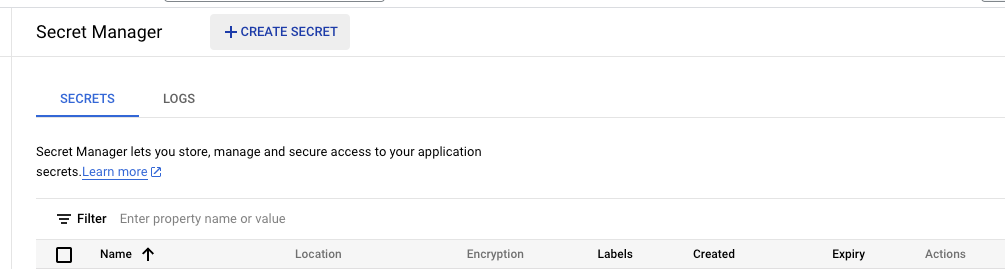
In GC, search for Secret Manager. Enable it if it’s not already active in the project.
Click Create Secret, name it (e.g. dataform_github_token), and paste the GitHub token into the secret value field.
Step 4: Create the Dataform repository in GC
In GC, go to BigQuery and select Dataform from the sub-menu.
Click Create Repository, give it a unique name and choose a region that matches the location of your tables.
You will be given a service account, ensure this service account has the correct permissions:
bigquery.user
secretmanager.secretAccessor
Note- make sure you are creating the repository in the region that your tables are in otherwise you will run into issues with incompatible region errors
Step 5: Connect Dataform to GitHub
Open your newly created Dataform repository in GC.
Click Settings and select Connect with Git.
Enter the GitHub repository URL, default branch (e.g. master or main), and the secret you just created in Secret Manager. Click Link.
Step 6: Set up a development workspace
Now that the repository is connected, set up a Development Workspace. Each workspace corresponds to a Git branch. For collaborative teams, using individual names for workspace IDs is a common practice. After creating your workspace, click Pull from Main Branch to get the latest version of the code.
Final thoughts
Setting up Dataform with GitHub integration streamlines your workflow by allowing efficient version control and collaboration. By ensuring the correct permissions and configurations, you can confidently manage data workflows, deploy scripts, and build out infrastructure smoothly.
This guide should help you navigate the process of setting up Dataform, whether you’re new to the tool or simply looking to refine your version-controlled SQL workflows. Happy coding!
Need help with your data platform?
We build intelligence platforms on BigQuery, Dataform and Google Cloud - from setup to ongoing optimisation.