You can't buy data strength. You build it.
Google made data strength central at GML 2026. But it is not a setting you switch on. Here is what actually builds it: consent, server-side, and a warehouse.
Mark Rochefort•21 Jun 2026
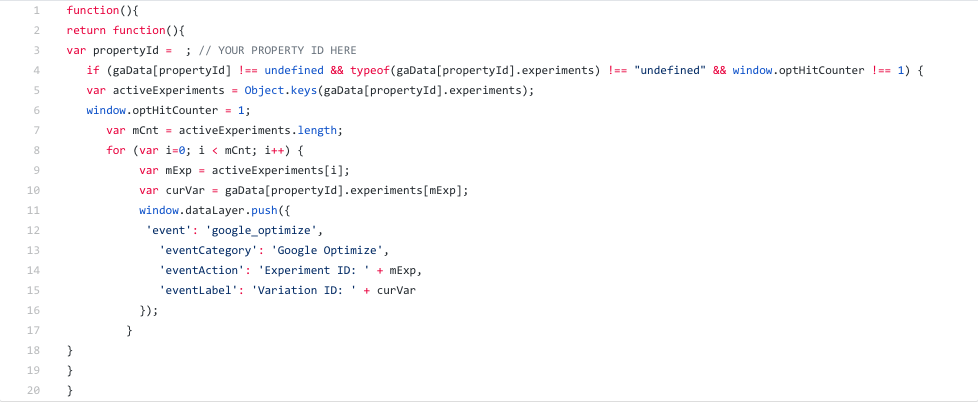
This is part 1 of what I hope will become a semi-frequent series on here, dedicated to reusable GTM solutions for scenarios or issues we've encountered more than once. This particular entry is a companion to Mark's piece from a couple of years back, but for Google Optimize rather that Optimizely. In short, it sends data layer pushes so you can fire Google Analytics events when there are Optimize experiments running, which saves you from using custom dimension slots etc in the course of ordinary analysis.
Here, we've got a bit of code that you'll want to set up as a custom JS variable, to set as hitCallback in the custom fields to set on your default GA pageview, as we want it to run after GA's available and any pageview hits are being sent. It checks to see if there are any Optimize experiments being run, then pushes to the data layer the ID and variations of any that are being run. Unfortunately there's no "human-readable" name available on the page as there is with Optimizely, but if you really want it to be readable in the GA interface, you can set up a lookup table or something to get the name from the experiment ID.
This being a hitCallback, the whole thing is a function returning another function.
function(){ return function(){
Then, we define the property ID - you'll want to set this to be a string—whatever the GA property you've got associated with Optimize is.
var propertyId = ; // YOUR PROPERTY ID HERE
We then check that the gaData global object exists, that there are active experiments and that we haven't done this before on this page.
if (gaData[propertyId] !== undefined && typeof(gaData[propertyId].experiments) !== "undefined" && window.optHitCounter !== 1) {
and then, if that's all correct, we create an array of the number of keys in the 'active experiments' object, set a global variable to 1 to prevent the data layer push from firing multiple times,
var activeExperiments = Object.keys(gaData[propertyId].experiments); window.optHitCounter = 1;
set a varable equal to the length of the experiments array,
var mCnt = activeExperiments.length;
loop through them all,
for (var i=0;i<(mCnt);i++) {
set variables equal to each experiment ID and variation,
var mExp = activeExperiments[i]; var curVar = gaData[propertyId].experiments[mExp];
And push to the data layer the ID value and variation ID for each of them, which you can set up a GA event tag against to send the information to GA.
window.dataLayer.push({ 'event': 'google_optimize', 'eventCategory': 'Google Optimize', 'eventAction': 'Experiment ID: ' + mExp, 'eventLabel': 'Variation ID: ' + curVar }); } } } }
And that's it, set that as hitCallback on your pageview and you'll be tracking your Optimize implementation events in no time. This solution is also available on Github, for those of you who don't want to copy it out of this blog post in little bits!
From GA4 implementation to server-side tagging and consent management - we'll make sure your data is accurate and complete.
Our instant analytics audit scans your GA4 configuration and flags what's missing, broken or misconfigured.
Google made data strength central at GML 2026. But it is not a setting you switch on. Here is what actually builds it: consent, server-side, and a warehouse.
Dara and Matthew chat with Juliana Jackson on her journey, product mindset, and how AI is shaping modern analytics.
Yali Sassoon joins The Measure Pod to discuss Snowplow’s growth, AI innovation, data challenges, and the future of user experience.