How to share access to a single BigQuery dataset with GCP IAM
Liam Grant·5 August 2021·4 min read
At Measurelab we’ve heard some horror stories about the deletion of critical datasets. Even though Google BigQuery has the BigQuery Backup Recovery of up to 7 days, it’s often better to err on the side of caution when it comes to allowing access to your data warehouse.
Those with rose-tinted glasses glued to their head might have a hard time lauding the usability of GCP IAM (the Google Cloud Platform’s Identity and Access Management). Clients find it to be one of the less understandable parts of the platform.
Before GCP IAM was introduced
Originally the GCP’s security settings were three-fold. Viewer, Editor and Owner. Three primitive basic roles for access to everything within one GCP. These roles are still around but really shouldn’t be used unless there is no alternative. To illustrate the problem, if you use the basic roles, that member of your team you granted Editor permissions for Cloud Storage, also now has Editor permissions on your Machine Learning Pipeline. Not the best.
The explosion of GCP IAM roles
Security exploded into IAM and now there are 4,167 (and counting) different permissions at Organisation, Folder, Project and Service levels. With some services like BigQuery allowing for Dataset, Table, Column and Row security. A true web of security, especially now that there is a hierarchy to permissions. This is great, but it often means you need permissions at two or even three different hierarchical levels in a mix and match that can leave your head spinning.
So simple? Yet so not
One of the most common dilemmas our clients bring to us is: how can I only allow a group of people to see a single dataset in my BigQuery data warehouse, rather than all the tables?
Need to connect your data?
Join marketing, customer and product data with tested models and documentation your team can use. Start with the sources needed for your question.
Here’s a guide on how to allow access to just one dataset on your Google Cloud Project.
Instructions
1. Create a Google Group (Optional)
This preliminary step is optional but will allow for easier management of the selected group of people from outside the Google Cloud Platform environment. If the group that you wish to give access to is large, or changes regularly requiring updates to permissions, this method will save you a lot of manual work.
Google Groups can be used instead of unique Google accounts. For the above-mentioned reasons, you might want to create Google Groups for more effective management of your GCP IAM roles.
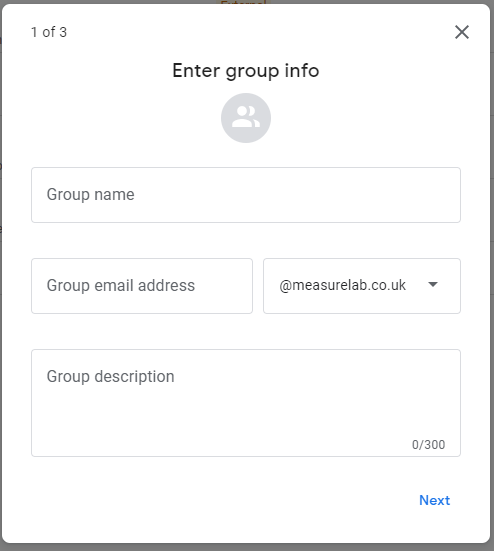
Click on the Create group button in the top left-hand corner of the screen.
Add in the relevant information and select a name for the google group, this will be the identifier that you can use within your Google Cloud Platform to manage permissions and roles.
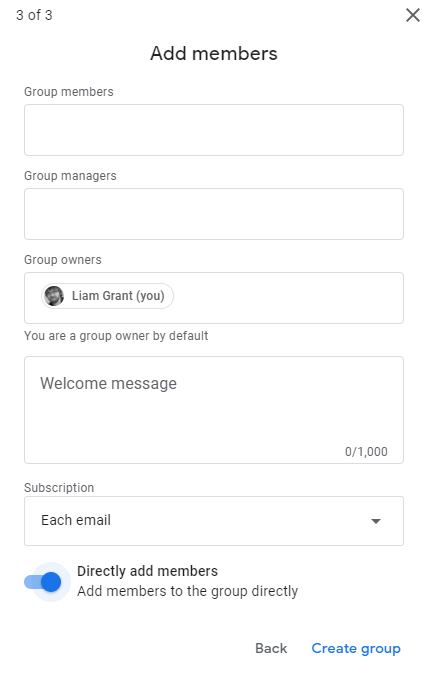
The next step is setting permissions of the Google Group, since the google group’s main goal is to act as a user for the permissions in Google Cloud Platform the following settings are suggested.
Finally, add members to the group, if you desire other users to manage the group access, add their emails as a Google Groups Manager. This is so you can invite a test account to the group to test the permissions within GCP once you have added the permissions.
2. IAM and Roles
To edit a user's Roles and Permissions within a project the Role Administrator Role is required.
Navigate the correct Google Cloud Project and then to IAM & Roles
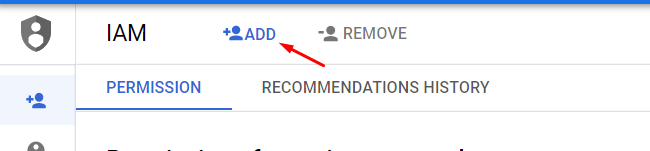
Click on the Add members in the top left-hand corner
Add the User or the Google group that you wish to see the data set into the new members.
Within select a role drop-down, filter by job user and then BigQuery Job User
Click Save.
3. Dataset Roles
To edit a user's Roles and Permissions within a project at dataset level the Role Administrator Role is required.
Navigate to the BigQuery Dataset that you wish to give access to and click share dataset
Within add members add the identifying address for the User or Users
Click on the role and then BigQuery
You are then given a selection of roles for the dataset only.
Select the Role you want to give and click save.
Resources
Understanding the roles you can select and what each means: BigQuery IAM Roles.
Need to connect your data?
Join marketing, customer and product data with tested models and documentation your team can use. Start with the sources needed for your question.