
#60 The inevitable… Google postpones sunsetting GA360
This week Dan and Dara discuss the recent announcement that the sunsetting of GA360 has been pushed back 9 months to the 1st July 2024.
Daniel Perry-Reed-
Insights
Troubleshooting and fixes (32 posts)
Explore a topic across our insights
32 results · Page 2 of 2
This week Dan and Dara discuss the recent announcement that the sunsetting of GA360 has been pushed back 9 months to the 1st July 2024.
This week Dan and Dara are joined by Stacey Harper, a fellow GA4 expert and trainer! They discuss war stories, hidden features and the huge importance of a migration strategy/plan for migrating to GA4.

This guide details the steps to be able to augment server-side GTM tags with data stored in BigQuery before they are sent to their endpoints.

There are a lot of different types of events in Google Analytics 4 that are not obvious when getting started. This guide details all the different event types and where and when they should be used.

How to enable analytics debug mode on an Android device, using the GA4/Firebase DebugView to monitor app event data.
This week Dan and Dara are joined by Lace-Chantelle Rogers to discuss why it's important to link GA4 to BigQuery as soon as possible.

It can be tricky judging how to pitch a new offer in times of crisis. There’s a fine line between being genuinely helpful and appearing exploitative. Sometimes you have to just jump in and try things, knowing they may be misinterpreted by the minority. In business, indecision can be crippling. While people’s lives are undoubtedly the most precious thing, livelihoods are worth saving too. A number of our clients - particularly those in the retail sector - have been hit hard by recent events.

This is part 2 of a semi-regular series, dedicated to reusable GTM solutions for scenarios or issues we've encountered more than once. Last time we looked at how to fire Google Analytics event to keep track of your Google Optimize experiments in GA, and this time we're looking at tracking clicks on iframes. We have encountered, several times, the situation of a client wanting to track clicks on an iframe. While we can't do much about interactions with stuff within the iframe without having GTM a

Here at Measurelab, we work predominantly with the Google stack but that doesn't stop us using other tools. As there's not much documentation available in the public forum on how to implement Enhanced Ecommerce in Google Analytics using Adobe Dynamic Tag Manager (DTM) formerly know as Satellite, I think this blog post would be useful. As good introduction to the tools itself, below there’s a useful overview of Adobe’s Dynamic Tag Management architecture, which is from their learning resource pa

<span style="font-weight: 400;">This article describes how to integrate Google Analytics for Firebase (formerly Firebase Analytics) to a React Native app. </span><span style="font-weight: 400;">In order to do this, you need to use a JavaScript bridge called </span><a href="https://github.com/invertase/react-native-firebase"><span style="font-weight: 400;">RNFirebase</span></a><span style="font-weight: 400;">. </span> This is lightweight layer sitting on top of native Firebase librarie
Google Tag Manager training is now live Right, folks, it’s happening! Our new Google Tag Manager training workshops are now live and ready to be booked! Thank you! Thank you! It has taken a bit of thinking and planning but we’ve finally decided to go ahead with it and we’re pretty pleased with the end results. What the workshop covers We’ll take you from the very basics - what’s a tag management system and how it works - to the more techy stuff such as how to deploy different vendors and c

Continuing the GA health check Last week, I covered the first few steps of our Google Analytics Health Check, as one of the first, and most important steps when putting together a measurement plan. To recap a bit, the main aim of a Health Check is to ensure that we are collecting the right information, filtering out any undesired data, to allow us to create actionable reports for the stakeholders that, at the same time, help them to make informed business decisions. Checking goals and funnels

If you are anything like me, you will have seen the fandangled new “enhanced” e-commerce reports that are starting to become available in Google Analytics accounts (N.B. - Universal web properties only) and thought “yes, I’ll have some of that”. The reports allow for much deeper analysis of shopping behaviour - to understand things like influence of product impressions on conversion - as well as providing much anticipated refund and voucher/ affiliate code support. In the spirit of catchy blog
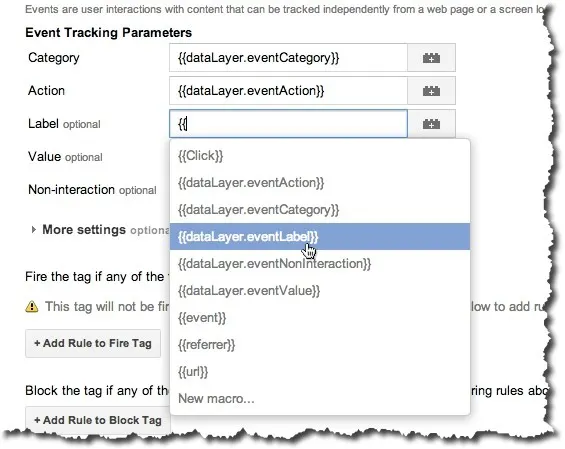
Tag Containers are great. In a former life I was developer and I can really appreciate how much help they can be to people wanting to just add a "bit of code" to a website. But, as said former developer, I can also appreciate what a potential disaster it is to give the marketing guys the ability to add code to a website - outside of your carefully considered source control mechanisms and deployment routines. So - the recent announcement (there's quite a few on that link) from the team at Google